Cute Baby: Evaluating a Hand-Drawn Dingbat Font for Nursery and Children's Design
Understanding the Nature of a Dingbat Font
When selecting typography for design projects, it is crucial to distinguish between standard text fonts and symbol-based typefaces. Cute Baby falls into the category of a dingbat font, meaning it does not contain alphanumeric characters (A-Z, 0-9). Instead, each keystroke generates a specific vector illustration. Unlike standard serif or sans-serif fonts used for body copy, this typeface serves a purely decorative function. It acts as a library of scalable vector graphics accessible directly through a word processor or design software. For designers, this distinction is the first step in evaluation; you cannot use Cute Baby to write a letter, but you can use it to decorate one.
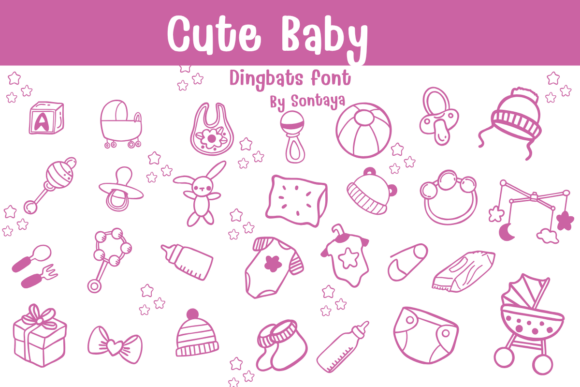
The defining characteristic of Cute Baby is its specific aesthetic language. The collection features a "monoline doodle style," which implies consistent stroke weights and a hand-drawn, artisanal quality. This sets it apart from more rigid, geometric icon sets or hyper-realistic illustrations. The icons cover a comprehensive range of nursery essentials, including strollers, rattles, pacifiers, and onesies, alongside decorative elements like stars and bows. For the adult user—whether a parent, a small business owner, or a graphic designer—understanding this visual style is essential for determining if it aligns with the project's tone.
Visual Style: Monoline Doodles vs. Polished Vectors
The market for children’s design assets is vast, ranging from whimsical watercolor sets to flat, minimalist vectors. Cute Baby occupies a specific middle ground with its hand-drawn charm. This style is often preferred when the goal is to evoke "sentimental beauty" and "whimsical charm" without appearing overly corporate or digitally sterile.
When comparing this style to other available resources, consider the "imperfection" factor. Hand-drawn styles like those in Cute Baby often feature slight variations in line weight or curvature that mimic real pen strokes. This contrasts sharply with the mathematical precision of vector icons found in standard UI kits. While a polished vector icon might look professional and clean, it can sometimes feel cold or generic in a nursery context. The Cute Baby style leans heavily into the "handcrafted" aesthetic, which can bridge the gap between digital design and physical textures like embroidery or knitting.
Tradeoffs in Visual Fidelity
However, this specific aesthetic comes with tradeoffs. The monoline doodle style works best on simple backgrounds or when layered with other hand-drawn elements. If your project requires a highly modern, geometric, or 3D look, the flat, sketched nature of Cute Baby may clash with the surrounding design language. It is not a universal solution for all children’s products; rather, it is a stylistic choice that prioritizes warmth over sleekness.
Practical Applications and Use Cases
Evaluating a resource like Cute Baby requires looking at its utility across different mediums. Its primary strength lies in stationery and print-on-demand products. The comprehensive set of icons makes it particularly effective for projects that require a cohesive visual theme across multiple items.
- Baby Shower Invitations and Milestone Cards: This is arguably the "best-fit" scenario. The icons are sized and styled to act as focal points or accents on paper goods. The inclusion of items like "first year" milestones (represented by rattles or pacifiers) makes it highly functional for this specific niche.
- Personalized Nursery Decor: For wall art or decals, the vector nature of the font ensures that the icons can be scaled to large sizes without losing quality. The "sentimental beauty" of the design fits well with nursery themes that aim for a cozy, soft atmosphere.
- Boutique Children’s Branding: Small businesses selling handmade baby clothes or accessories often struggle to find branding assets that don't look like stock art. The artisanal style of Cute Baby can lend a "mom-and-pop" authenticity to logos or packaging, though it should be used carefully to avoid looking amateurish.
Comparing Cute Baby to Alternative Resources
When deciding whether to purchase or download Cute Baby, it is helpful to compare it against other methods of sourcing similar imagery.
1. Stock Illustration Packs
Standard stock illustration packs often provide high-quality PNG or SVG files. These are excellent if you need a specific scene (e.g., a baby sleeping in a crib) with complex coloring. Cute Baby, being a font, typically offers monochromatic line art. If your project requires full-color illustrations with shading and depth, a standard illustration pack might be more versatile. However, if you need dozens of small, cohesive icons that are easy to type and arrange, the font format is often faster and more lightweight for the software to handle.
2. General Clip Art
General clip art libraries often suffer from inconsistency. You might find a stroller icon that looks stylistically different from a rattle icon. One of the main advantages of Cute Baby is the "comprehensive set" approach. Because all icons are designed by the same hand, they share the same line weight, scale, and aesthetic. This cohesion is vital for professional-looking design work. Users do not need to spend time adjusting stroke widths to make different elements match; the font handles the uniformity.
3. Hand-Drawing Your Own Assets
For those with artistic skills, drawing custom assets is always an option. However, this is time-consuming. Cute Baby serves as a shortcut for those who want the "hand-drawn" look without the hours of sketching and vectorizing. It is a resource for efficiency, allowing the user to focus on layout and composition rather than illustration.
Decision Factors: When to Choose Cute Baby
Making an informed decision involves weighing the strengths of the product against your specific project constraints.
Choose Cute Baby if:
- Your project relies on a monoline, doodle aesthetic.
- You need a large variety of baby-related icons (strollers, clothes, toys) that look like they belong together.
- You are working on vector-based projects (like SVGs for web or cut files for vinyl cutters) where scalability is key.
- You want to add a personal, "handmade" touch to digital designs.
Consider an alternative if:
- You require full-color, complex illustrations with gradients and textures.
- Your design style is minimalist and geometric rather than sketchy.
- You need actual text characters for writing paragraphs or headings (this is a symbol font only).
- The project requires photorealistic imagery.
Integration and Workflow
From a practical standpoint, using a dingbat font like Cute Baby integrates smoothly into standard workflows. Once installed on the operating system, the icons appear in the font menu of software like Adobe Illustrator, Photoshop, Canva, or even Microsoft Word. This allows for rapid prototyping. A designer can type out a series of icons to test placement before committing to a final layout.
However, there is a learning curve associated with symbol fonts. Users must often refer to a "key map" (a PDF or image provided by the font creator) to know which letter on the keyboard corresponds to which icon. For example, typing the letter "A" might produce a pacifier, while "B" produces a bootie. While this is standard for dingbats, it is less intuitive than browsing a visual library of clip art. Once the user becomes familiar with the layout, however, the speed of access is comparable to or faster than searching through folders of image files.
Conclusion: Aesthetic Cohesion for Niche Projects
In the realm of design assets, Cute Baby offers a specialized solution rather than a general-purpose tool. It excels in providing a unified visual language for nursery-themed projects. By offering a comprehensive collection of hand-drawn essentials—from strollers to sweet accessories—it solves the problem of visual inconsistency that plagues many DIY designs.
For the adult user evaluating this resource, the decision hinges on stylistic alignment. If the project goals include evoking "innocent wonder" and "handcrafted warmth," and if the medium supports monochrome or single-color line art, Cute Baby is a strong contender. It provides a sentimental, whimsical charm that is difficult to replicate with standard corporate icon sets, making it a valuable asset for personalized stationery, boutique branding, and heartfelt nursery decor.